The address shown on the IPaadress.ee home page is usually not your phone’s or laptop’s private network address. It is the public IP address of the connection that reached this site — the address the rest of the internet currently sees you as.
It is not the device’s local network address
On home Wi‑Fi, a computer or phone typically has a private address such as 192.168.1.24 or 10.0.0.15. That address is not used on the public internet. The home router performs network address translation (NAT): many devices share one public address.
So this page almost always shows the WAN address of the home router or modem, assigned by the internet service provider. A phone, a computer and a TV on the same home network usually see the same number.
Example in the diagram
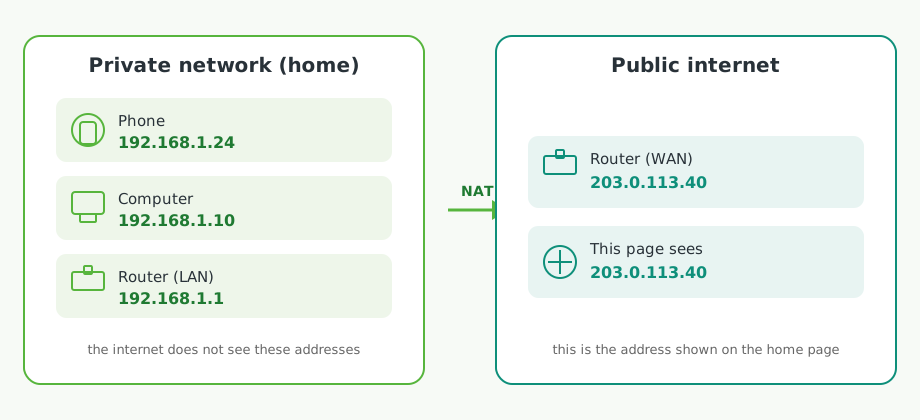
The diagram shows a private home network on the left and the public internet on the right. The phone (192.168.1.24), computer (192.168.1.10) and the inside of the router (192.168.1.1) use addresses the internet does not see. The router performs NAT and gets the WAN address 203.0.113.40. This page sees that same public address.
Examples in the table
| Kind | Who uses it | Example |
|---|---|---|
| Private | Phone, computer or TV on home Wi‑Fi | 192.168.1.24, 10.0.0.15 |
| Private | Inside of the home router (LAN) | 192.168.1.1 |
| Public | Router internet side (WAN) — what this page shows from a home network | 203.0.113.40 |
| Public | Workplace firewall, carrier CGNAT or a VPN exit node | another public address, often shared by many users |
The table repeats the addresses from the diagram and adds work, mobile and VPN. 203.0.113.40 is a documentation example (RFC 5737), not a real visitor IP.
Workplace, mobile and VPN
- At work, the displayed address is often the company’s firewall, proxy or gateway public IP, shared by many employees.
- On mobile (and some home connections) the operator may use carrier-grade NAT (CGNAT). Then the address is not even unique to your home, but a shared operator exit address.
- On a VPN, you see the VPN service’s exit-node IP, not that of your home or office.
- With IPv6, the address can sit closer to the device or the home address prefix, because NAT is used less. It can still change (privacy addresses) and is not a permanent device identifier.
How does this page know it?
The web server sees the other end of the TCP connection. That is the address replies are sent back to. The page does not read your computer’s list of network adapters or the router’s admin interface.
If you open the site on the same machine locally (for example at 127.0.0.1), localhost is shown, because the traffic never went out to the internet.
What to take from this
The displayed address answers: what public IP does the internet see me as right now? That helps with network troubleshooting, checking a VPN, and knowing what websites and services see.
It is not a unique device fingerprint, the Wi‑Fi router’s LAN address, or a MAC address. It is also not a guarantee that the address belongs only to you.
You can see your current public address on the IPaadress.ee home page.